Do you want to view your land information online? The Bhulekh Bihar portal is a facility provided by the Bihar government, where you can easily access information such as your land records, khasra, khatauni, bhu naksha, and other important land records. Through this portal, you can easily access your land records, khata, khasra, khatauni, bhu naksha, and other important land records.
If you want to know the information related to Bihar Bhumi gov 2025, then the points given below will be useful for you –
Khasra Number: This is the unique identification number of a plot of land.
Bhu Naksha: It shows the map of the boundaries and size of your land.
Khata Number: This is the identification number of the land owner.
Bihar Bhumi – Understand important terms related to Bihar Bhumi
Before using the portal, it is important to know the meaning of these terms:
- Khata: This is a consolidated statement of all the land owned by a family. A single Khata can contain multiple Khasras (plots).
- Khesra: Also called a plot number, this is an identification number assigned to a specific piece of land.
- Jamabandi : This is the Record of Rights (RoR) of the land, which contains details of the owner of the land, its area, and the rent.
- Mutation: When a land is bought or sold, the process of removing the name of the old owner and entering the name of the new owner in the government records is called mutation.
- LRC: Its full name is Land Reforms Commissioner. This department is responsible for managing land records in Bihar.
Bhulekh Bihar How to View Your Account (ROR) Online?
- To view your account or Record of Rights, follow the steps given below:
- First of all go to the View Your Account page of Bihar Bhoomi Portal .
- A map of Bihar will open in front of you. Select your district.
- After selecting a district, a list of all the circles within that district will appear. Click on your circle.
- Now you have to choose Mauza i.e. the name of your village.
- Now you will have multiple options to search Land Record Bihar Online :
- View all accounts of Mouza by name
- View all accounts of Mouza according to Khesra number
- View by account number
- View by Khesra Number
- View by account holder name
- Select an option as per your convenience, enter the details and click on the ‘Search Account’ button.
- You will be presented with the account holder’s name and account number. Clicking ‘View’ will display your complete land details (ROR) on the screen, which you can print.
How to view Bihar Land Record Jamabandi Register online?
- The process to view the Jamabandi Register, which contains detailed details of your land, is as follows:
- Click on the option View Jamabandi Register on the official website .
- Select your district and zone and press the ‘Proceed’ button.
- Now choose your light and socks.
- You will get many options to search like – Part Current, Raiyat Name, Plot Number, Account Number, Jamabandi Number etc.
- Select an option, enter the details and security code and click on ‘Search’.
- A list of tenants will appear below. Click on “View” (the eye icon) next to your Jamabandi.
- A copy of your Jamabandi Register will open on your screen. You can download or print it by clicking the ‘Print’ button.
Do you want to view your land information online? The Bhulekh Bihar portal is a facility provided by the Bihar government, where you can easily access information such as your land records, khasra, and land map. Through this portal, you can easily access your land records, khata, khatauni, land map, and other important land records.
If you want to know the information related to Bihar Bhumi gov 2025, then the points given below will be useful for you –
Khasra Number: This is the unique identification number of a plot of land.
Bhu Naksha: It shows the map of the boundaries and size of your land.
Khata Number: This is the identification number of the land owner.Learn more
land map online
Land Information – Advanced Search
Filed Revocation Application Status
View Jamabandi Register (in 22 languages)
Check Aadhar / Mobile Seeding Status
Amortization Plus Application Status
Directorate of Land Records and Survey
Government land registration rejected
Proof of Mutation along with the application
Information about civic amenities
Bihar Bhumi – Understand important terms related to Bihar Bhumi
Before using the portal, it is important to know the meaning of these terms:
- Khata: This is a consolidated statement of all the land owned by a family. A single Khata can contain multiple Khasras (plots).
- Khesra: Also called a plot number, this is an identification number assigned to a specific piece of land.
- Jamabandi : This is the Record of Rights (RoR) of the land, which contains details of the owner of the land, its area, and the rent.
- Mutation: When a land is bought or sold, the process of removing the name of the old owner and entering the name of the new owner in the government records is called mutation.
- LRC: Its full name is Land Reforms Commissioner. This department is responsible for managing land records in Bihar.
Bhulekh Bihar How to View Your Account (ROR) Online?
- To view your account or Record of Rights, follow the steps given below:
- First of all go to the View Your Account page of Bihar Bhoomi Portal .
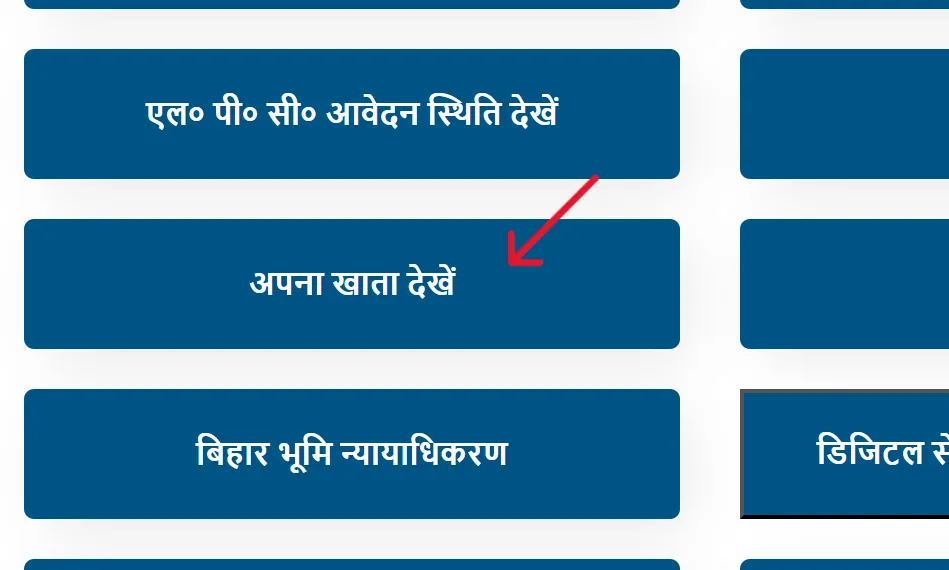
- A map of Bihar will open in front of you. Select your district.
- After selecting a district, a list of all the circles within that district will appear. Click on your circle.
- Now you have to choose Mauza i.e. the name of your village.
- Now you will have multiple options to search Land Record Bihar Online :
- View all accounts of Mouza by name
- View all accounts of Mouza according to Khesra number
- View by account number
- View by Khesra Number
- View by account holder name
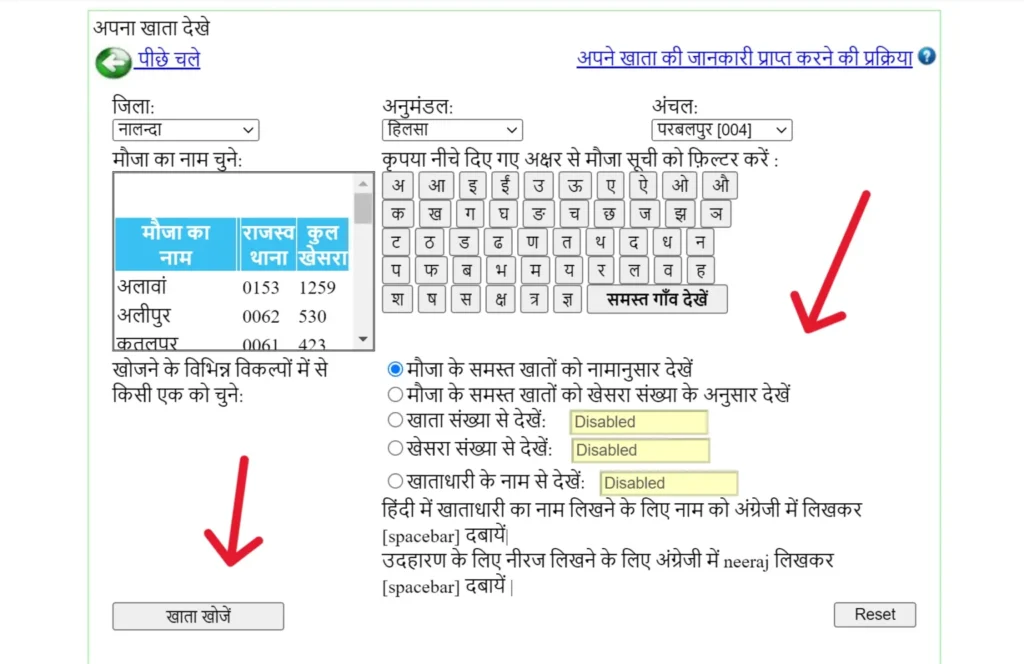
- Select an option as per your convenience, enter the details and click on the ‘Search Account’ button.
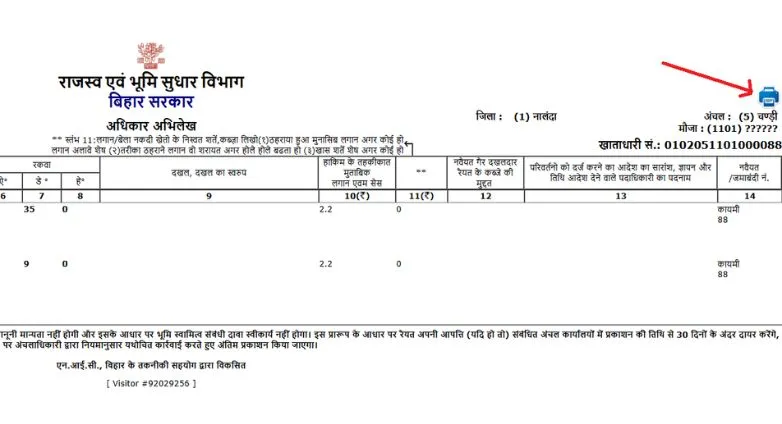
- You will be presented with the account holder’s name and account number. Clicking ‘View’ will display your complete land details (ROR) on the screen, which you can print.
How to view Bihar Land Record Jamabandi Register online?
- The process to view the Jamabandi Register, which contains detailed details of your land, is as follows:
- Click on the option View Jamabandi Register on the official website .
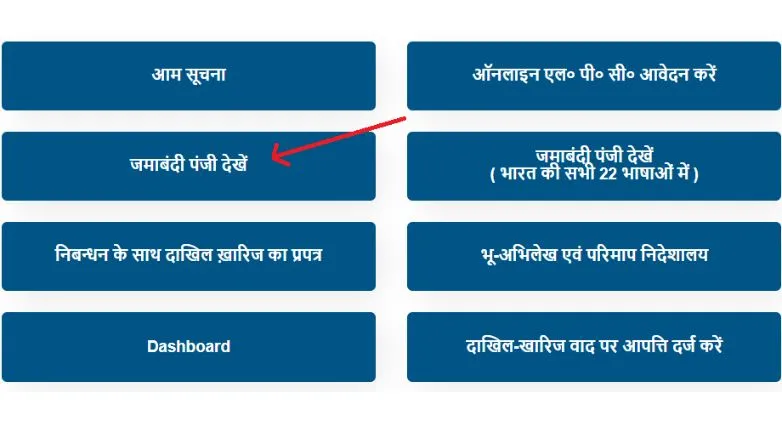
- Select your district and zone and press the ‘Proceed’ button.
- Now choose your light and socks.
- You will get many options to search like – Part Current, Raiyat Name, Plot Number, Account Number, Jamabandi Number etc.
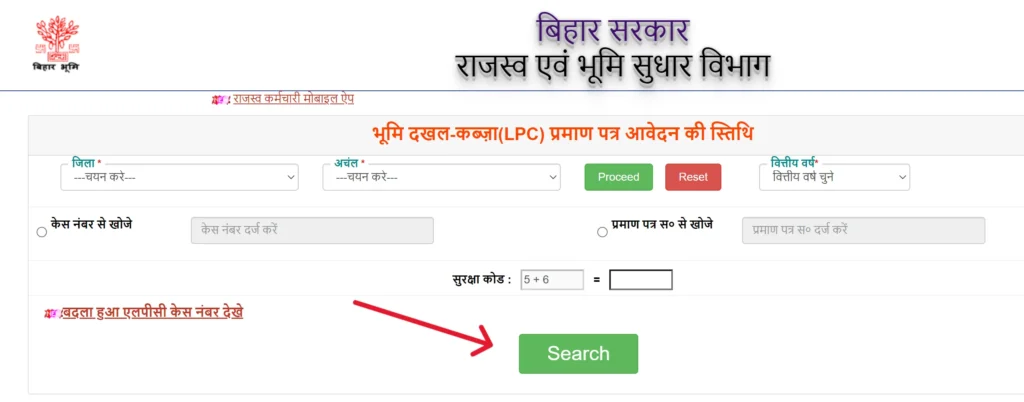
- Select an option, enter the details and security code and click on ‘Search’.
- A list of tenants will appear below. Click on “View” (the eye icon) next to your Jamabandi.
- A copy of your Jamabandi Register will open on your screen. You can download or print it by clicking the ‘Print’ button.
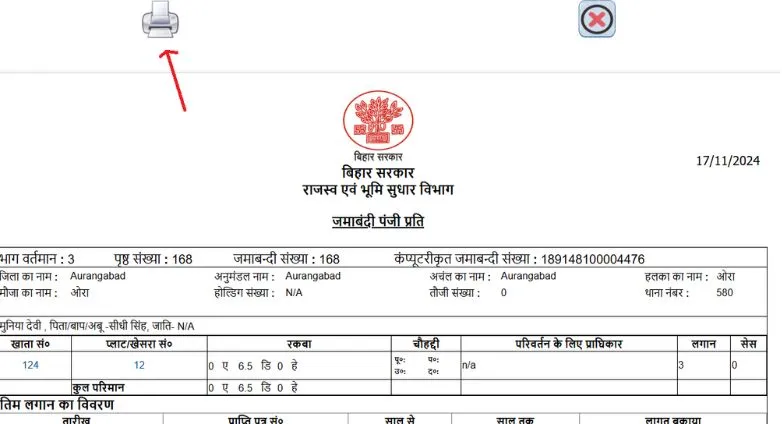
Note: In Bihar, Khasra is called ‘Khesra’ and Khatauni is called ‘Jamabandi’.
Bihar Bhulekh – View Jamabandi Register in 22 languages
A unique feature of the Bihar Bhoomi portal is that you can view your Jamabandi Register in all 22 official languages of India. This feature is especially useful for those who are not fluent in Hindi or English. You can view the records in your preferred language by selecting the “View Jamabandi Register (in all 22 Indian languages)” option on the portal.
How to view Bhumi Bihar Land Map online?
- Follow these steps to view the map of your land:
- First of all visit the official portal of Bhu-Naksha Bihar .
- On the left side, select your District, Sub Div, Circle, and Mauza.
- As soon as you select, the map of your village will appear on the screen.
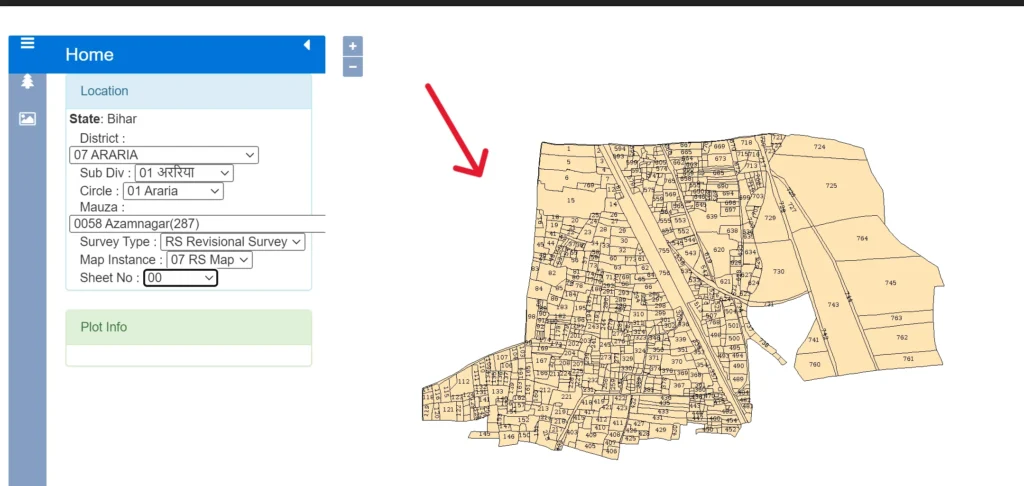
- You can directly click on your Khasra (Plot) number in the map or search by entering the Khasra number in the search bar above.
- On clicking the plot, ‘Plot Info’ will appear on the left side, which will contain the name of the owner and the area of the land.
- Click on ‘LPM Report’ for a detailed map report.
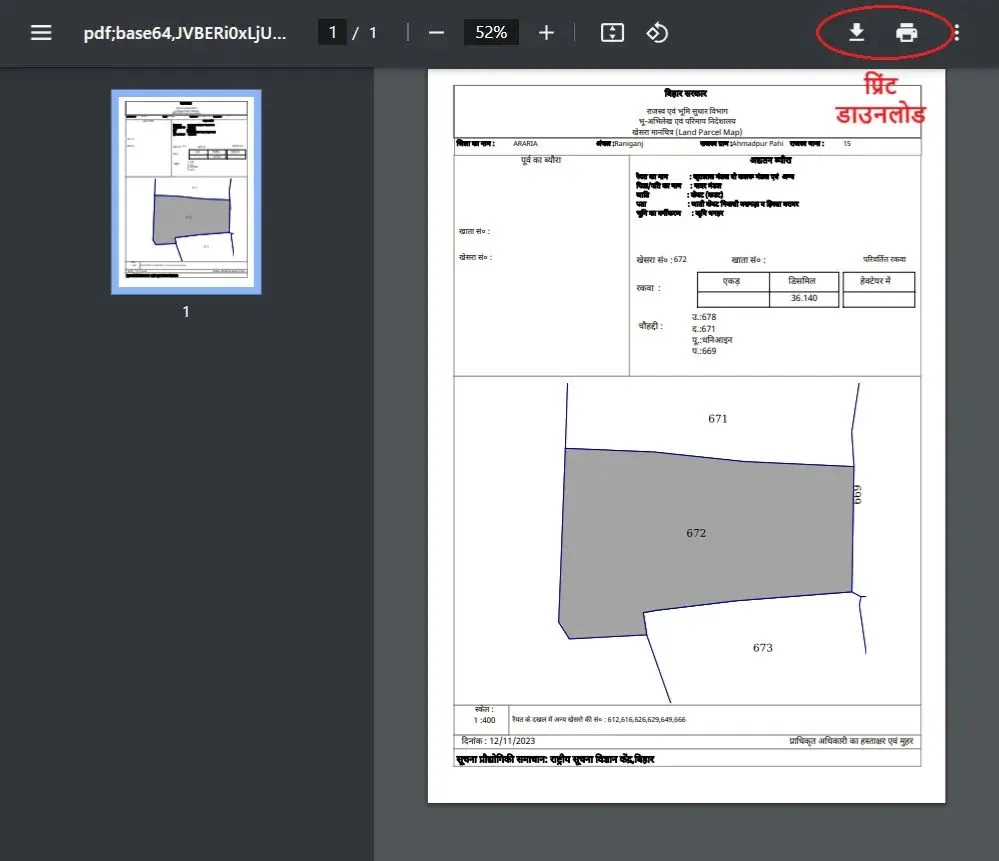
- Your land map will open in a new window, which you can print or save as PDF.
Apply Online for LRC Bihar Dakhil Kharij (Mutation)
It is mandatory to register on the portal before applying for mutation.
Registration and Login Process
| phase | Description |
|---|---|
| Step 1: Registration | First, visit the official portal and click on ‘Registration.’ Create an account by filling in your personal information such as name, mobile number, email address, and address. |
| Step 2: Login | After registration, go to the login page . Select ‘Citizen’ from Citizen/Operator/Department. Login by entering your registered mobile number and password. |
Application Process:
- After login, select your district and zone.
- Click on ‘Apply New Mutation’.
- Select the application type (e.g. On Application, Sale/Purchase) and click on ‘Save & Next’.
- Document Details: Enter your registry deed details (deed number, registry date, amount).
- Buyer & Seller Details: Fill in the name, address and other details of the buyer and seller.
- Plot Details: Enter land account, khasra, area and boundary details.
- Upload Document: Upload the scanned PDF file of your Registry Deed.
- After verifying all the information, click ‘Final Submit’. You will receive a case number, which you should keep for future reference.
Bihar Bhulekh – Error Check in Filing-Cancellation Application
Before submitting your application, be sure to use the “Filing Rejection Error Check” feature available on the portal. This tool identifies any errors or deficiencies in your application in advance, reducing the chance of your application being rejected.
Integrated Form of Mutation with Registration
The Bihar Bhumi portal now offers the “Registration and Mutation Form.” This means that when you register your property, the Mutation application is also processed simultaneously. This is an integrated process that saves time.
mutation of government land
If you have been allotted government land or wish to take action regarding government land, the portal offers a special feature called “Rejection of Government Land.” This requires a separate process and documentation.
Bihar Bhumi Jankari: See Mutation Status
- Click on Mutation Application Status on Bihar Bhumi Portal .
- Select your district, zone and financial year.
- Now you can search the status by case number, deed number, or mouza wise.
- Select the option, enter the details and security code and click on ‘Search’.
- The current status of your application will appear on the screen. You can also download the receipt from here.
Status of application returned by the Circle Officer
If your Mutation Application has been returned by the Circle Officer (CO) for any reason, you can check the reason for rejection using the ‘View Mutation Application Status (Returned by Circle Officer)’ option and re-apply after making necessary corrections.
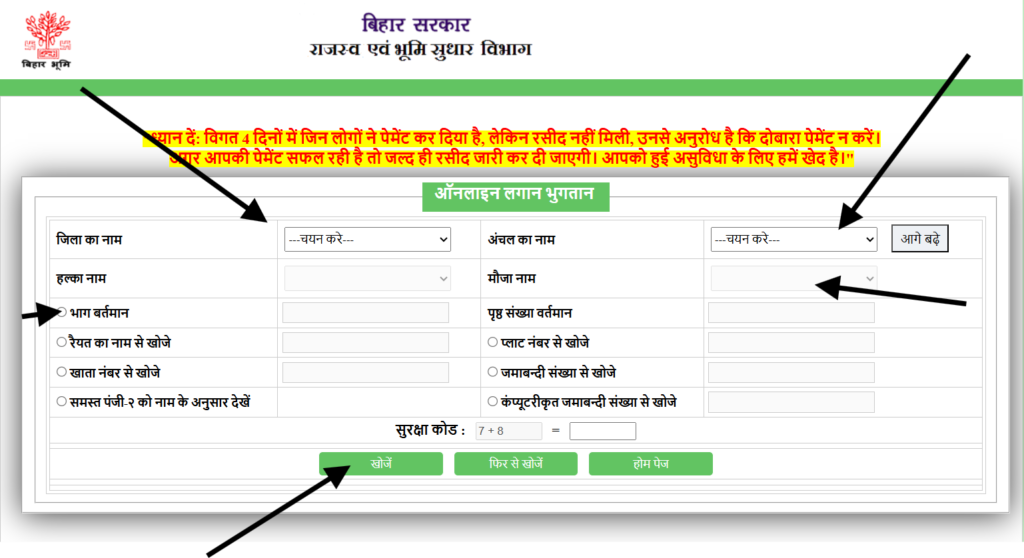
Pay Land Tax online on Bihar Bhumi Portal
Now you can also pay land tax from the comfort of your home:
- Click on the ‘Land Revenue’ option on the portal’s homepage, then select ‘Pay Online’.
- Login by entering your mobile number and password (this is the same login used for mutation).
- Select your district, zone, Halka, and mouza.
- Enter the current portion of your land and the current page number (you will find this information on the Jamabandi Register).
- Click on ‘Search.’ Your rent dues will be displayed.
- Click ‘Pay Now’ and complete the payment via Net Banking/Debit Card. Please download the online receipt after payment.
Other services available on the Land Record Bihar portal
Scrape and Scrape Plus Services
| Service | Description | When to use |
|---|---|---|
| Modification | If there is any mistake (like error in name, account, khasra or area) in your Jamabandi or land record, you can apply for correction online through ‘Parimarjan’. | For small errors |
| Modification Plus | This is an advanced service for more complex corrections, including corrections to multiple records, ownership dispute resolution, and cadastral map corrections. | For complex cases |
| Modification plus status | Real-time status tracking of your Parimarjan Plus application. If returned by the Circle Officer, a separate status check is also available. | Application for tracking |
Bihar Bhulekh – Revenue Court Management System
The Bhulekh Bihar portal now also integrates the Revenue Court Management System. Through this feature:
- You can check the status of cases pending in the Revenue Court.
- You can know the date of the next hearing
- View complete case history and documents
- You can file Vakalatnama online
Bihar Land Tribunal
If you have a land dispute or a mutation issue, you can appeal online to the Bihar Land Tribunal. This feature is specifically for cases where:
- The mutation application has been rejected
- Ownership dispute हो
- Objection has to be filed in Mutation
E-Survey Service
E-Mapi is an innovative service of Bihar Bhoomi Portal through which:
- You can get your land surveyed electronically.
- Can get accurate GPS-based measurements
- Boundary disputes can be resolved scientifically
- You can get digital survey report
SMS alert service and Aadhaar seeding
By activating the SMS alert service on the portal, you can:
- You can receive all updates about your application via SMS.
- You can get reminder of land tax due date
- You can receive important notifications immediately
Link your land records with Aadhaar through Aadhaar/Mobile Seeding and avail all the services easily.
Map Home Delivery of Revenue Maps
Now you don’t need to go to the office to get revenue maps. Under the ‘Doorstep Delivery of Revenue Maps’ service:
- You can get a copy of the certified land map delivered to your home.
- Get authentic documents by paying nominal delivery charges
- Get maps with legal validity for court cases
Bhulekh Bihar – Public Grievance Portal
Through the integrated public grievance portal on the Bihar Bhumi portal:
- Report any land related issues
- Report corruption or delay
- Get a unique tracking number for your complaint
- Guaranteed resolution within 30 days
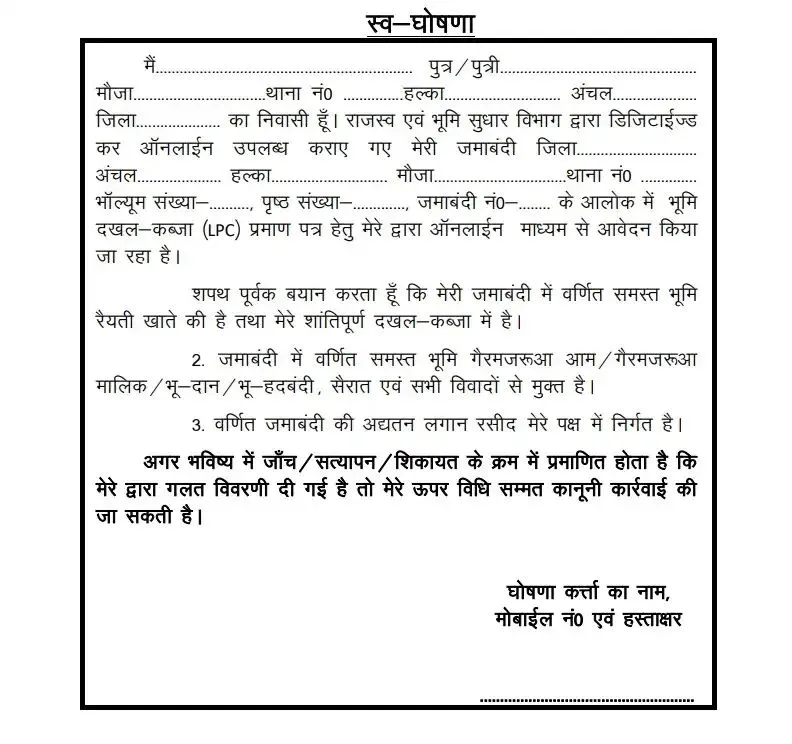
(LPC) Application Process
A Land Possession Certificate (LPC) is official proof of land ownership. The application process is simple:
- Get certificate after verification: After the verification is complete, LPC will be issued, which you can get from the revenue office.
- Prepare the required documents: Khasra number, Identification proof (Aadhaar/PAN), Proof of ownership (Sale deed, Will etc.).
- Visit the Revenue Office: Get the LPC application form from the Tehsil or Revenue Office of your area.
- Fill the application: Fill the form with correct information and attach all the required documents.
- Submit: Submit the application and documents to the appropriate authority. Ensure you obtain a receipt.
DCLR Mutation Appeal
If your mutation application is rejected by the Circle Officer (CO), you can file an appeal online in the DCLR Court.
land map
This service provides you with all types of maps and survey data related to your land.
Detailed information about civic amenities
In the ‘ Information about Citizen Amenities ‘ section on the portal, you will find:
- Step-by-step guide of all services
- Required documents की checklist
- Information about processing time and fees
- Video tutorials और user manuals
- Access to integrated services of other government departments through Service Plus Bihar
Land Records Portal of Other States
Different states in India have different official portals for viewing land records. Just as the Bhulekh Bihar portal allows you to view your Khata, Khesra, and Bhu-Naksha online, citizens of Madhya Pradesh can use the MP Bhulekh portal to view Khasra-Khatauni, land records, and Bhu-Naksha online. If you own land in Madhya Pradesh, this portal will be useful.
Procedure for filing objection on mutation case
If a wrong mutation application has been filed on your land by someone else, you can use the ‘File objection to Mutation Case’ facility to:
- Submit objection online
- Supporting documents upload करें
- Clearly state the reason for the objection
- Get Hearing Date
Bihar Bhumi Contact Information
For any problem or assistance you can contact the Revenue and Land Reforms Department:
- विभाग:- Department of Revenue and Land Reforms, Government of Bihar
- पता:– Old Secretariat, Bailey Road, Patna – 800015
- Helpline Number :- 18003456215
- Email: :- emutationbihar@gmail.com
FAQs About Bihar Bhulekh
- What is Bihar Bhoomi Portal?Bihar Bhoomi (biharbhumi.bihar.gov.in) is an official online portal of the Bihar Government where citizens of the state can view and apply for their land related records like Jamabandi, Khata-Khesra, Bhu-Naksha, and Mutation.
- How can I check my account and khasra number?You can check your land details by account holder name, account number or Khasra number by going to ‘View Your Account’ option on Bihar Bhoomi Portal, selecting your district, zone, and mouza.
- What documents are required for mutation?For online mutation application, you mainly have to upload the scanned PDF copy of the Registry Deed (Sale Deed).
- Can I correct the mistake in my land records online? Yes, you can apply online to rectify mistakes related to name, address, account, khasra or area in your Jamabandi using the ‘Parimarjan’ facility on the Bihar Bhoomi Portal.
- How to pay land tax online?You can view the outstanding land revenue by going to the ‘Land Revenue’ section, entering your Jamabandi details (Part Current and Page Number) and pay the same online through Net Banking or Debit Card.
Bhu Map Bihar Bhu Map Bihar (Blue Map) 2025 @ bhunaksha.bihar.gov.in
With the Bhu Naksha Bihar portal, you can now view the map of any land in Bihar online. All records, including accounts, Register II, land maps, land revenue, records, and mutations, are available digitally on the Bihar Bhumi portal. This portal provides citizens with transparent services, time savings, and the convenience of accessing all land-related information from the comfort of their homes.
Bihar Land Map – Key Information
| Subject | Description |
|---|---|
| Land Map | Bihar Land Records (Bhulekh Map) |
| Portal | Bhu Nakshatra Bihar |
| official website | bhunaksha.bihar.gov.in |
How to see Bihar Bhu Naksha Online?
To view the land map of Bihar, you need to visit the official Bhu Naksha Bihar portal directly. This portal specifically provides digital maps of every land area in the state.
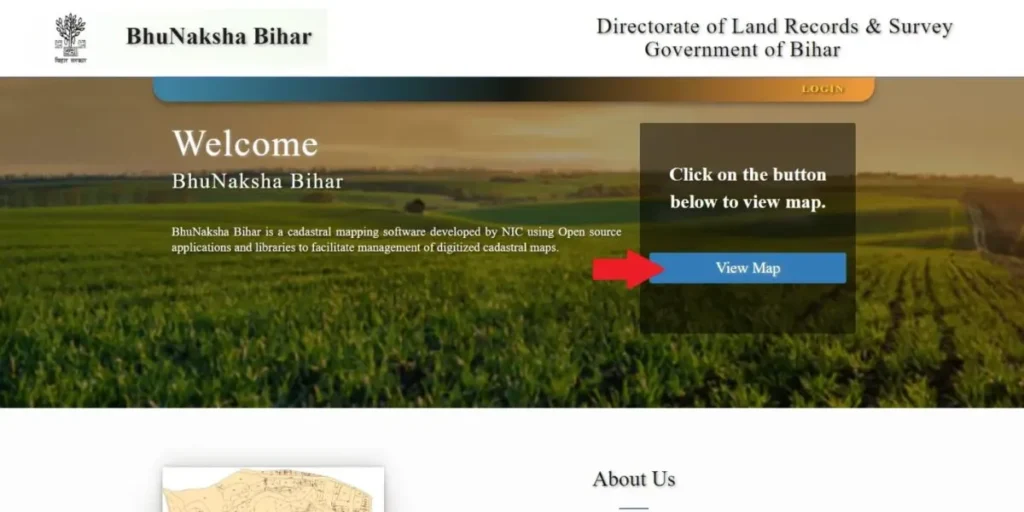
- Open the website – bhunaksha.bihar.gov.in
- Click on “ View Map ” button on the home page
- Now select your District, Sub-Division, Circle, Mouza, Survey Type, Map Instance and Sheet No.
- After selecting all the options, a map of that place will appear in front of you.
If you want to view your plot details :
- Click on the plot on the map
- Or enter the plot number from the Search Menu
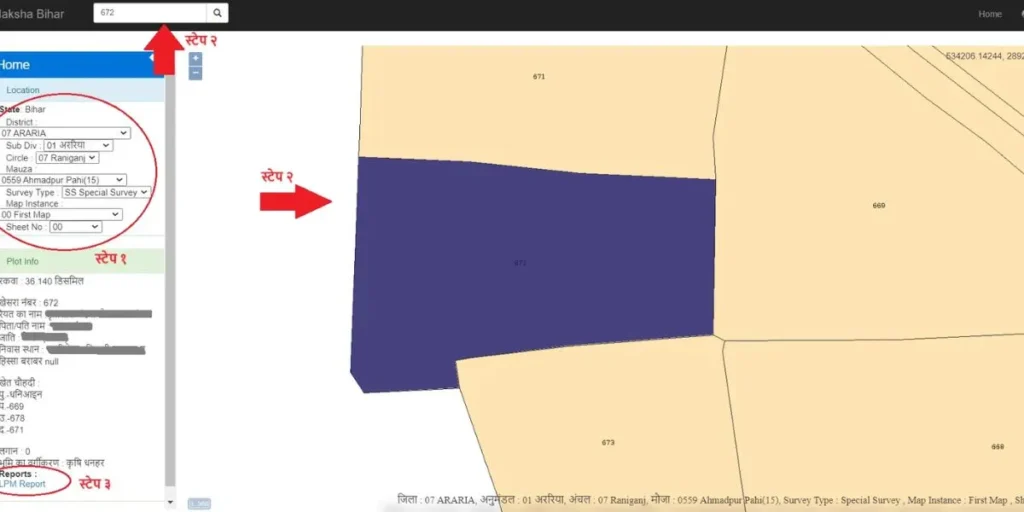
The Plot Info section will then display all the land and owner information. Click “LPM Report” to download a detailed report.
How to download Bihar Bhu Naksha?
Once your plot is opened, you can easily download or print its map report . This report can also be used as a land document.
Benefits of Bhu Naksha Bihar Portal
- Now there is no need to go anywhere to see the land map of Bihar.
- You can view the map from your mobile or laptop while sitting at home.
- The entire process is fast, easy and completely online
- Facility to download and print maps
- Saves both time and money
- Instantly view the map by just entering the Khata number, Plot number or other land details
Bhu Naksha Bihar – Maps of which districts are available?
The portal offers online land maps for several districts in the state of Bihar. More districts are being added over time. Below is a list of the main districts currently available on the portal:
| List 1 | List 2 |
|---|---|
| Nalanda | Bhagalpur |
| Madhepura | Patna |
| Supaul | Bhojpur |
| Lakhisarai | Purnia |
| Araria | Buxar |
| Kishanganj | Rohtas |
| Arwal | Darbhanga |
| Madhubani | Sarhasa |
| Aurangabad | East Champaran |
| Munger | Samastipur |
| dandy | Went |
| Muzaffarpur | Saran |
| Begusarai | Gopalganj |
| Nawada | Sheikhpura |
| Jehanabad | Jamui |
| Sitamarhi | Shivhar |
| Kaimur | Siwan |
| Katihar | Vaishali |
| Khagaria | West Champaran |
People in all these districts can easily view their land maps online through the portal. In the future, this service will be expanded throughout Bihar.